Students, schedule, and payments in one tutor workspace
You work solo and don’t want to run everything through spreadsheets and messaging apps. Lesson bookings, reminders, invoices and payment QR codes, attendance, and results for each student: all in one place, on your phone and computer.
The first 14 days are free, with every feature. No card needed.

Everything a tutor needs, and nothing extra
It’s the same workspace language schools use, but without the things only a team needs. Admins, schedules, and timesheets don’t get in the way.
Scheduling and booking
One calendar: one-on-one lessons and small groups. Students choose available times themselves and reschedule lessons according to your rules.
Reminders and messages
Students receive lesson reminders in Telegram (WhatsApp in development), and confirmations and reschedules arrive by email. You no longer have to write “tomorrow at 18:00?” manually. Conversations with students live in one Messages window, and you can start a video call right from a chat: nothing to install.
Invoices and payment QR codes
Issue invoices, show students your QR code or payment details, and mark payments as received with one tap. The money goes directly to you.
Attendance
Mark “attended / no-show” for each lesson, see history for every student, and set late cancellation rules.
Student profile
Notes, level, goal, and parent contacts. For children, the account is confirmed by a parent.
Four languages
Workspace, emails, and bot in Russian, Kazakh, English, and Spanish. Each user chooses their own language.
Coming soon
Words and grammar soon
Students learn the language in the same workspace: word cards with smart repetition and level-based grammar.
Desktop app in development
New words from what a student reads go into their cards in one click.
Online payment in development
Pay for a membership by card right in the workspace: the money comes to you, with no transfers or reconciliation.
The first tutors help choose what we build first.
The tutor workspace: the screens you will use every day
These are real screens of the workspace with made-up data: this is what a tutor’s working day looks like.
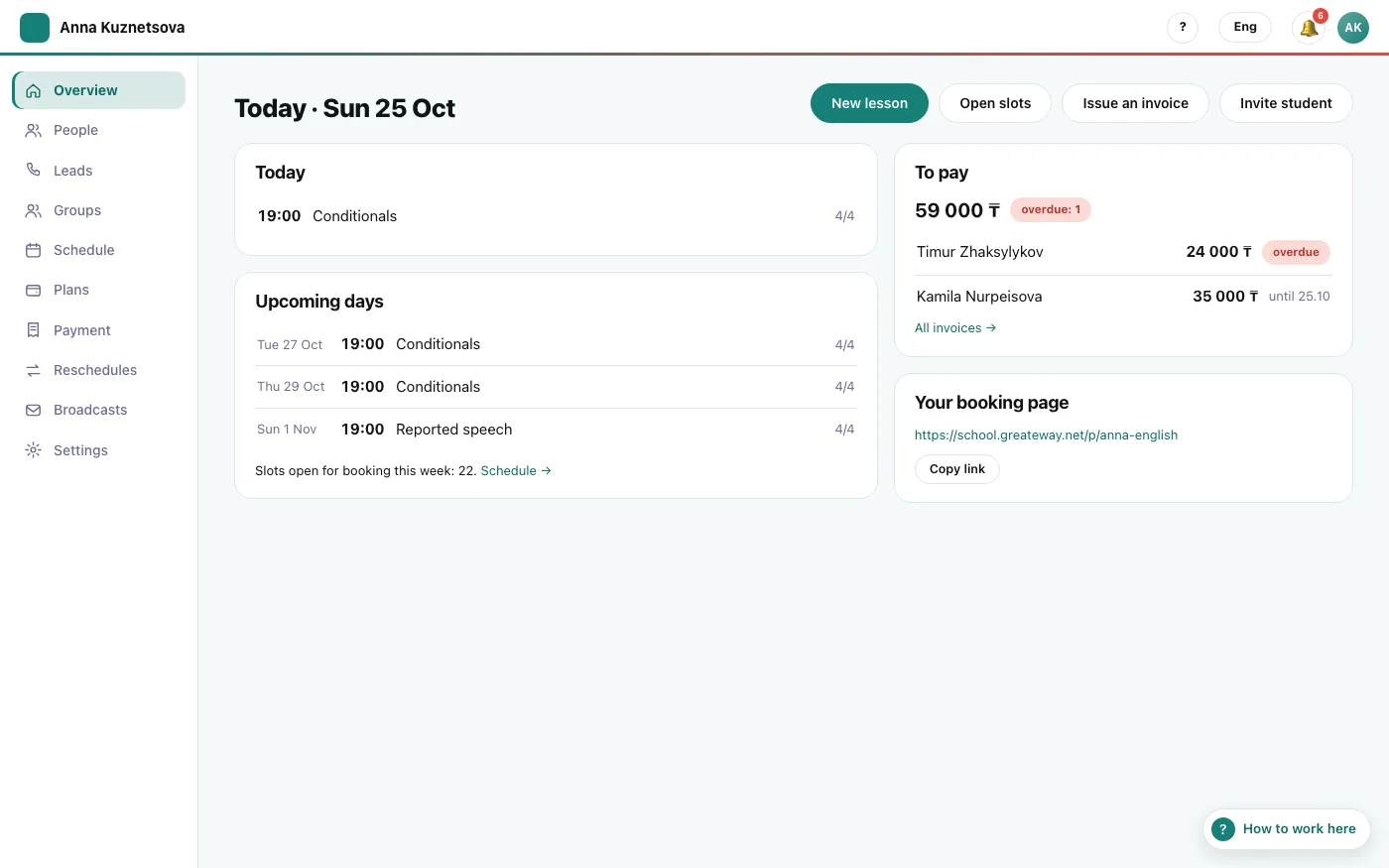
Your day on one screen
Open the workspace and see at once what you have today and who owes what.
- Lessons for today and the next few days
- Who owes money and what is overdue
- What is waiting for you: requests, reschedules, memberships about to end
- Free slots for booking are counted separately
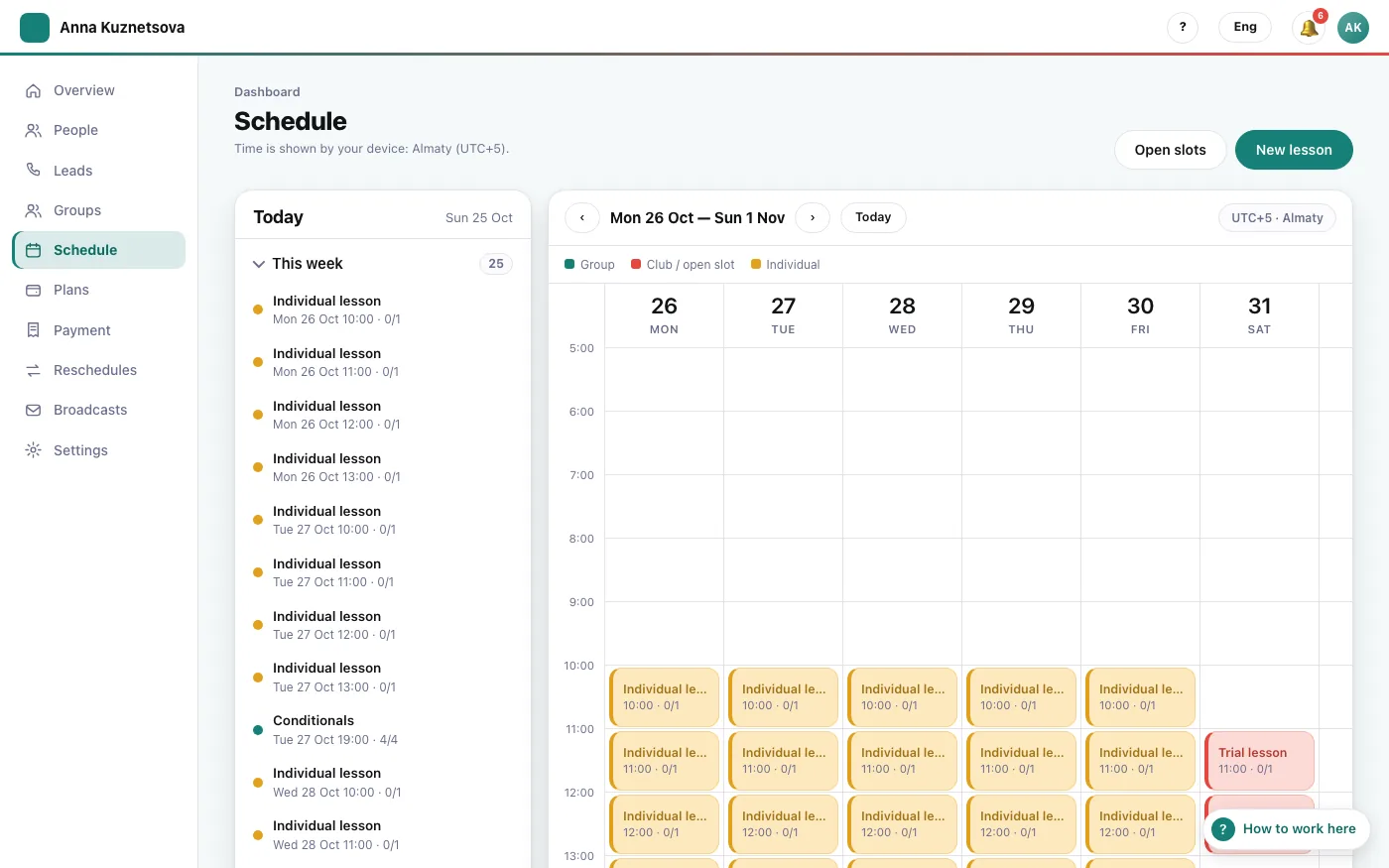
Open slots in a minute
Pick the days, hours and format: the workspace creates all the slots, and students book on their own.
- A week with lessons and free slots, a grid from 5 am to midnight
- “Open slots”: days of the week, hours, length, break, format
- You can replace your earlier free slots with new ones
- You can’t schedule two lessons at the same time
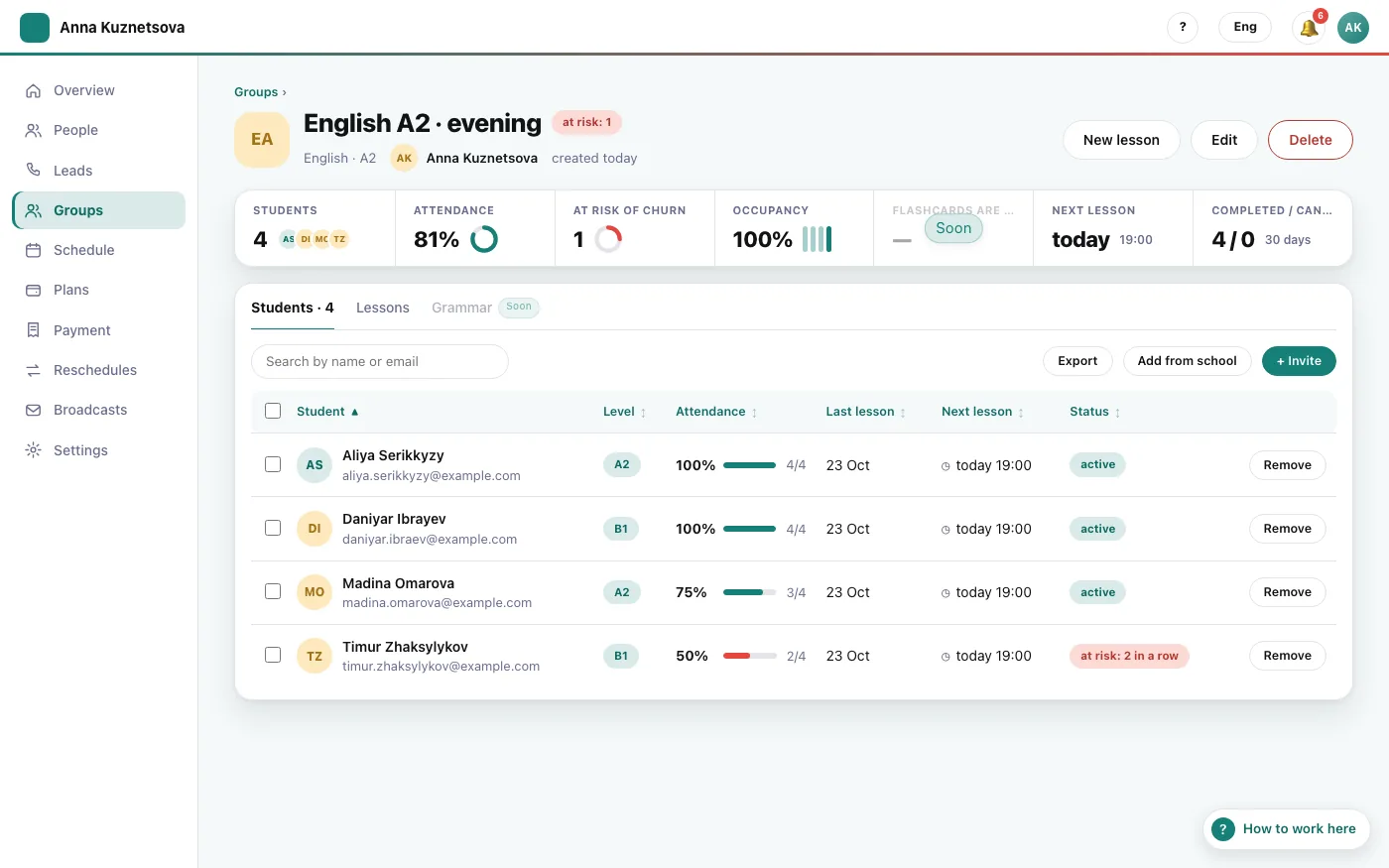
See who attends and who drifts away
The group list shows attendance and signals for each student, so you don’t need to open registers.
- Attendance, level and next lesson for each student
- An “at risk” flag when a student misses two lessons in a row
- Notes on each student and lesson history
- Invite a student with a single link
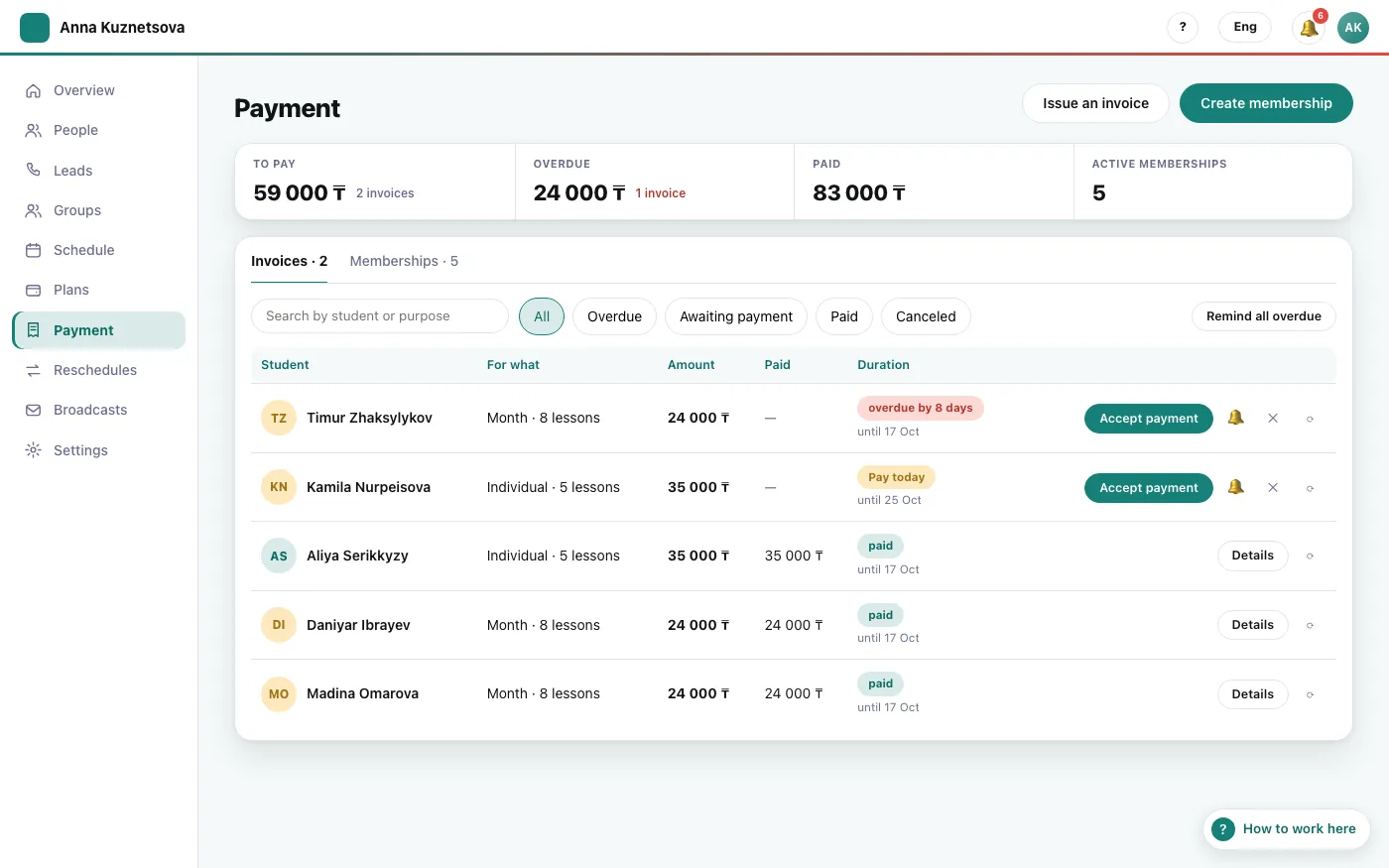
Money under control
Memberships with remaining lessons, invoices and reminders for late payers in one place.
- Plans and memberships: monthly, lesson pack, single lesson
- Invoices, payment recording and “repeat invoice” in one click
- Reminders to late payers with one button
- Students see a QR code or payment details in their own account
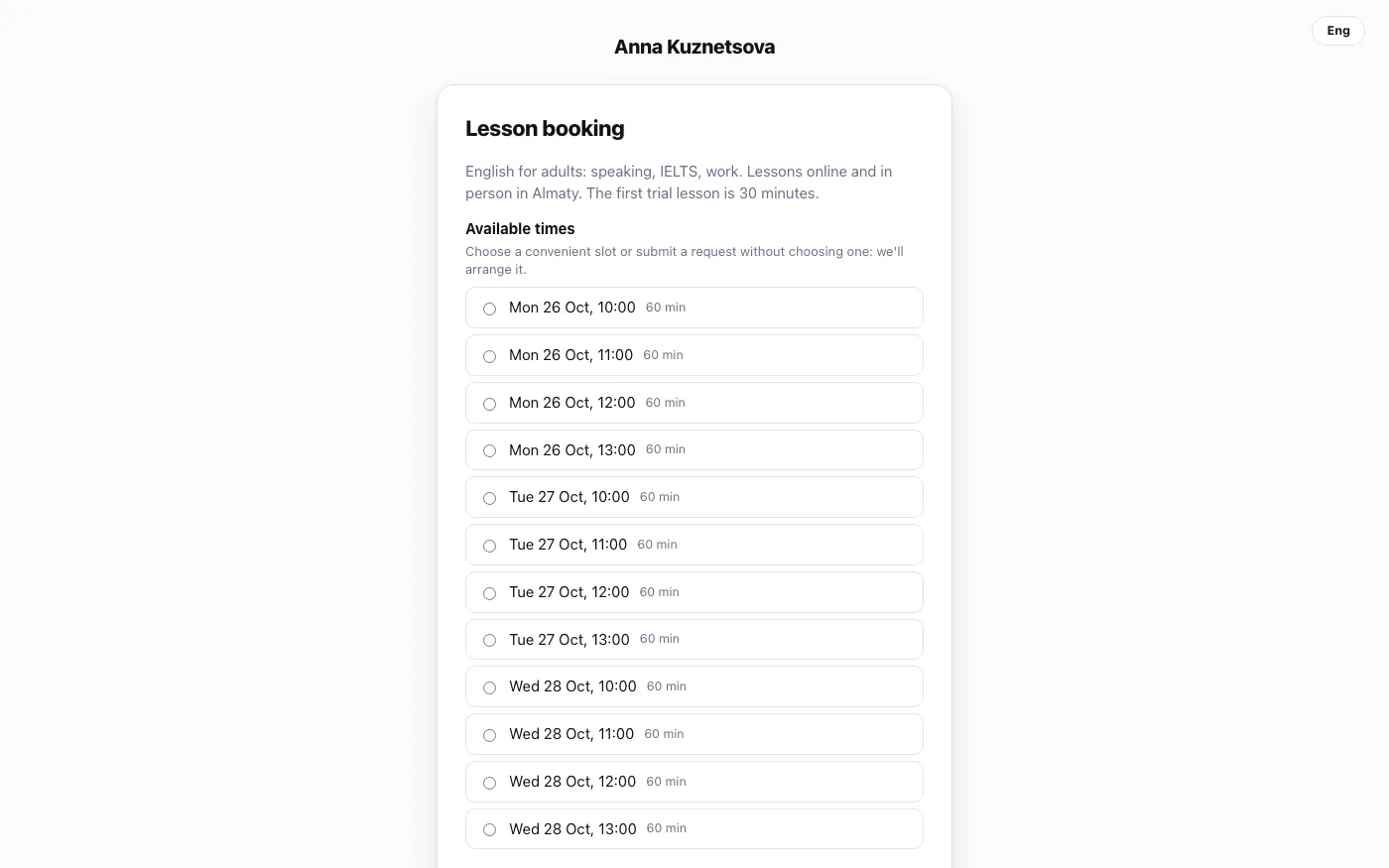
One link for new students
A new student sees your free time and leaves a request for a trial lesson.
- A link like school.greateway.net/p/your-name
- The student picks a slot or just leaves a request
- The request lands in your workspace and in Telegram (WhatsApp in development) right away
- Nothing to install, works from a phone
Two versions: Core and Pro
Core includes everything you need to manage students and get paid. Pro adds leads, broadcasts, ratings, and analytics.
Tutor
Core: a super-simple workspace
- Students, groups, schedule, bookings, and rescheduling
- Attendance and student notes
- Invoices, lesson packages with remaining lessons, QR codes, and payment details
- Reminders and notifications, a bot in Telegram (WhatsApp in development)
- Messages with students and video calls right from the chat
- Import students from Excel or CSV
Tutor Pro
Everything in Core, plus:
- Leads and a pipeline: from first message to trial lesson; Telegram leads arrive in the Messages window
- Broadcasts to students and parents
- Lesson ratings from students and your goals
- Analytics: money, debtors, student retention
- Detailed insights: who is taking lessons, who is skipping, and who might leave
Do you have students taught by other tutors?You can turn your workspace into a school: your data, students, and invoices will be preserved.
FAQ
How is this different from the school version?
It’s the same workspace, but for one tutor: you’re both the owner and the teacher. There are no admins, weekly approvals, or time tracking. If a team appears, your workspace turns into a school with one click.
How does a student join my workspace?
Via your invitation link. The student signs up themselves, and you see them in your list. You can also import existing students from Excel or CSV.
How do I accept payments?
You issue an invoice and share your bank details or your bank’s QR code with the student (e.g., Kaspi). When the money arrives, you mark the invoice as paid and it closes. The money goes directly to you; we don’t accept or hold it.
What about children?
The age at which parental consent is required depends on the country. When a student under this age registers, the system requests parental consent; until it is received, the account is restricted.
Does it work on a phone?
Yes. The workspace is optimized for phones and tablets, and there’s nothing to install.
How much does it cost?
There are two plans, “Tutor” and “Tutor Pro”, billed monthly. Prices are shown above on this page; you can subscribe, renew or cancel in the workspace itself. Refund terms are on the refund policy page.
What languages does the workspace support?
Russian, Kazakh, English, and Spanish. Each user chooses their own language: a tutor and their students can work in different languages.
Where is the data stored?
For details, see the privacy policy.
Do your students learn a language? Give them the GreateWay app: it remembers new words from what they read and watch.
Still have questions?
Write to us and we’ll reply within one business day.
If it’s easier to start with a conversation or you need help migrating students, leave your contact details. You can also create a workspace right away, without a lead form.
- We’ll reply within one business day
- We’ll help you migrate students from a spreadsheet
- No obligations