The whole language school — in one CRM
Groups, schedule, lesson booking, attendance, leads, payments and director analytics. Students and parents receive notifications in Telegram (WhatsApp in development), while the director can see in advance which students are about to leave.
The first 14 days are free, with every feature. No card needed.

A CRM that sees not only payments but also how students are doing
Most CRMs show who is enrolled and who has paid. GreateWay adds attendance, leads and money into one picture, so “churn risk” is calculated from actual missed lessons, not guesswork.
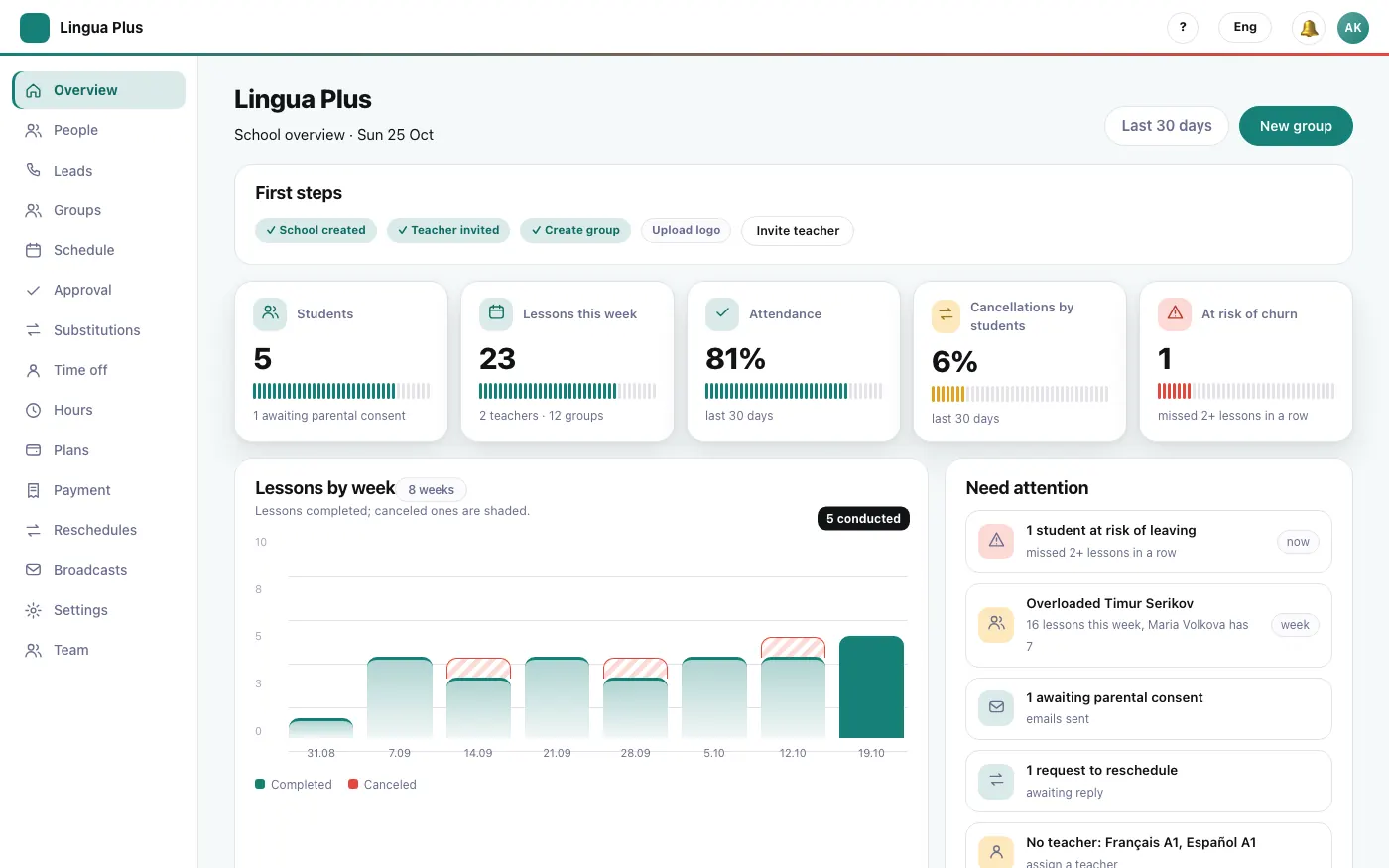
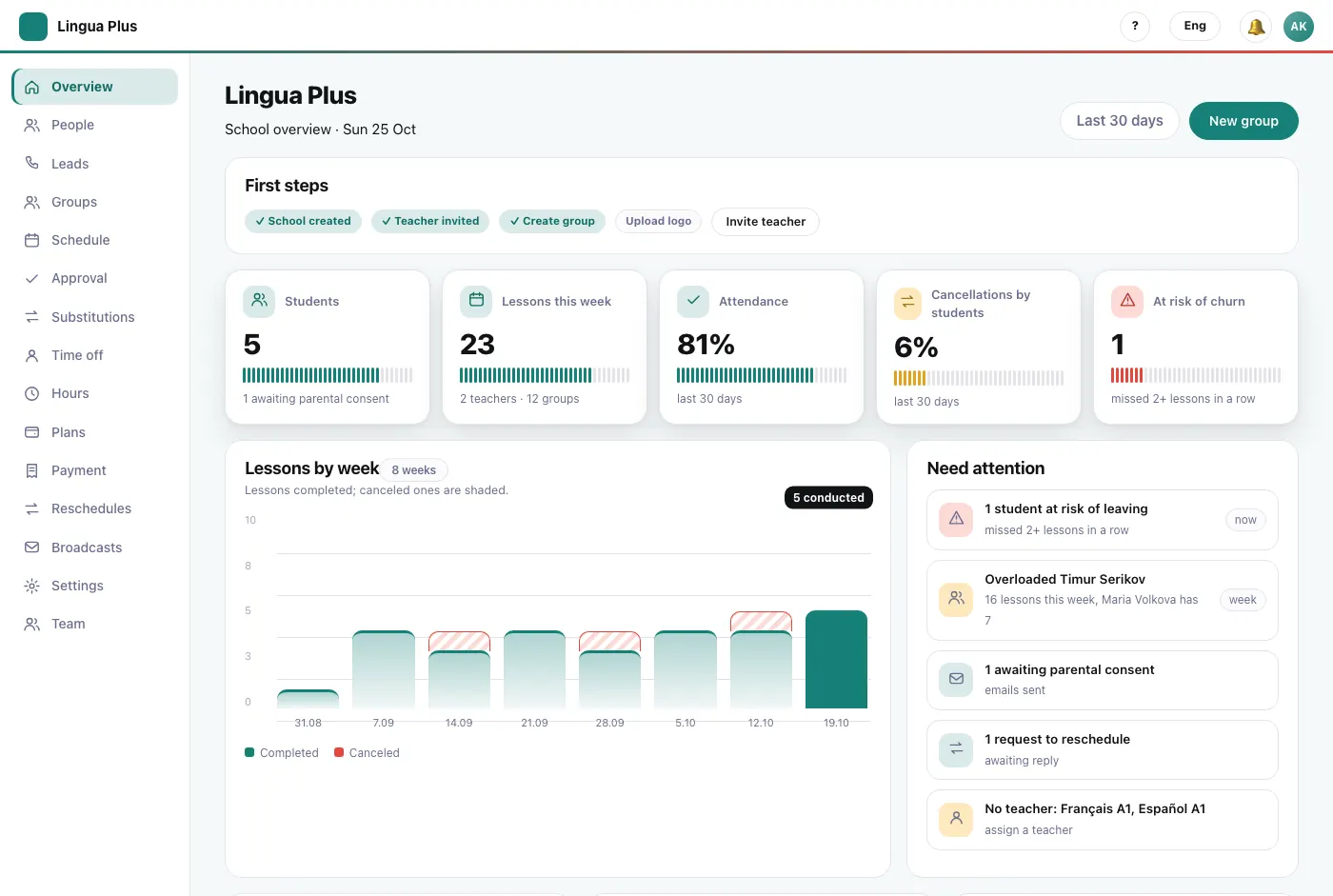
The whole school on one screen
The director opens the dashboard and immediately sees the week’s numbers and what needs attention.
- Students, teachers, groups, and lessons this week
- Attendance and cancellation rate over 30 days
- Money: revenue, expenses, and profit — visible to the director and those he has granted access.
- “Needs attention”: churn risk, teacher workload imbalance.
- Checklist of first steps for a new school
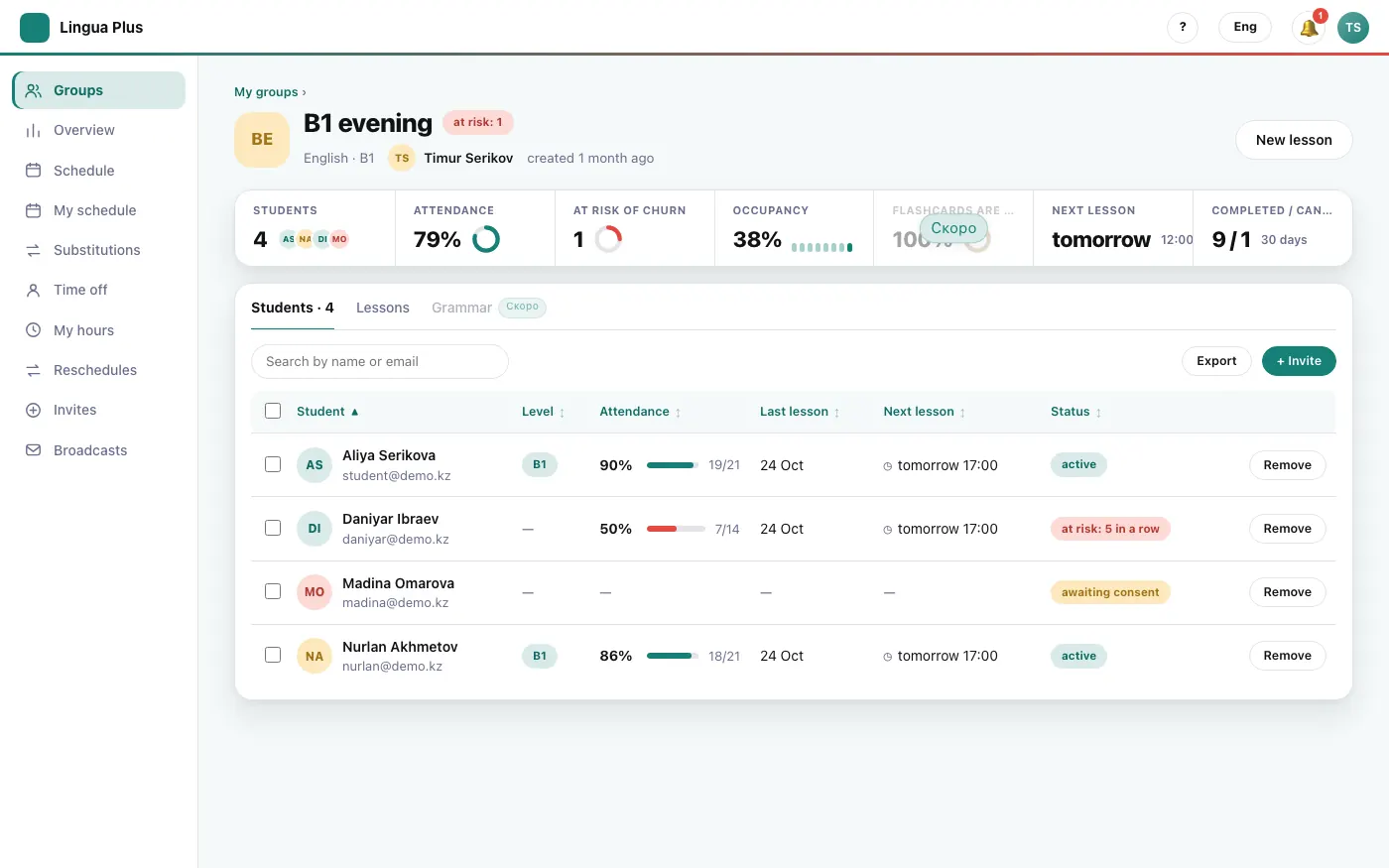
A teacher sees in seconds who is falling behind.
The group list shows attendance and signals for each student — no need to open journals.
- Attendance and last/next lesson for each student
- Labels: “missed 3 in a row”, “no-show”, “awaiting consent”
- Student profile: lesson history, teacher notes, contacts
- Group invite code — with an expiration date
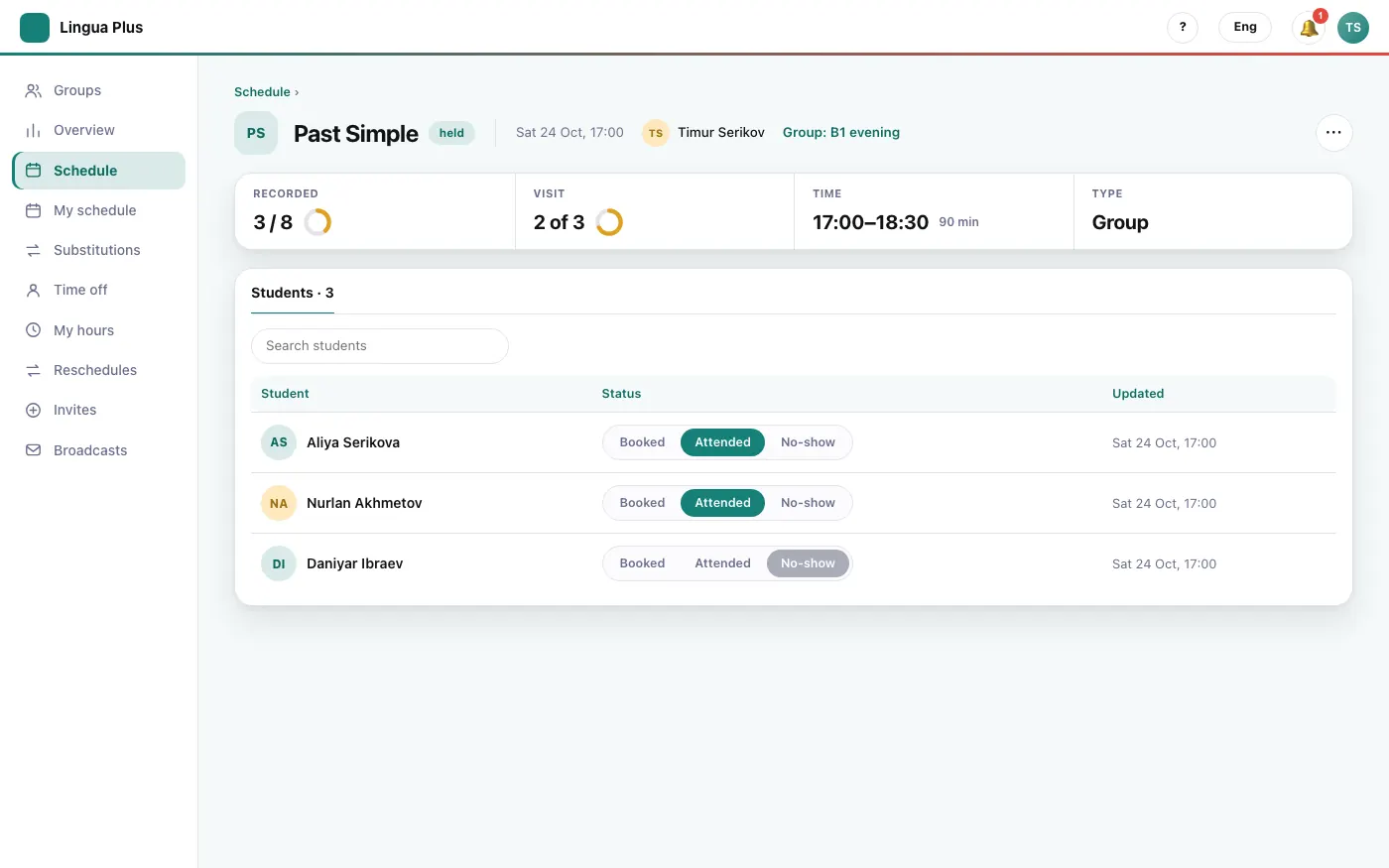
Attendance in two clicks
During the lesson, the teacher marks “attended / no-show”. These marks immediately go into analytics and the student profile.
- List of booked, cancelled, and waitlisted students
- Complete or cancel a lesson — students will receive a notification
- Creating a lesson or slot: time, duration, group, spots
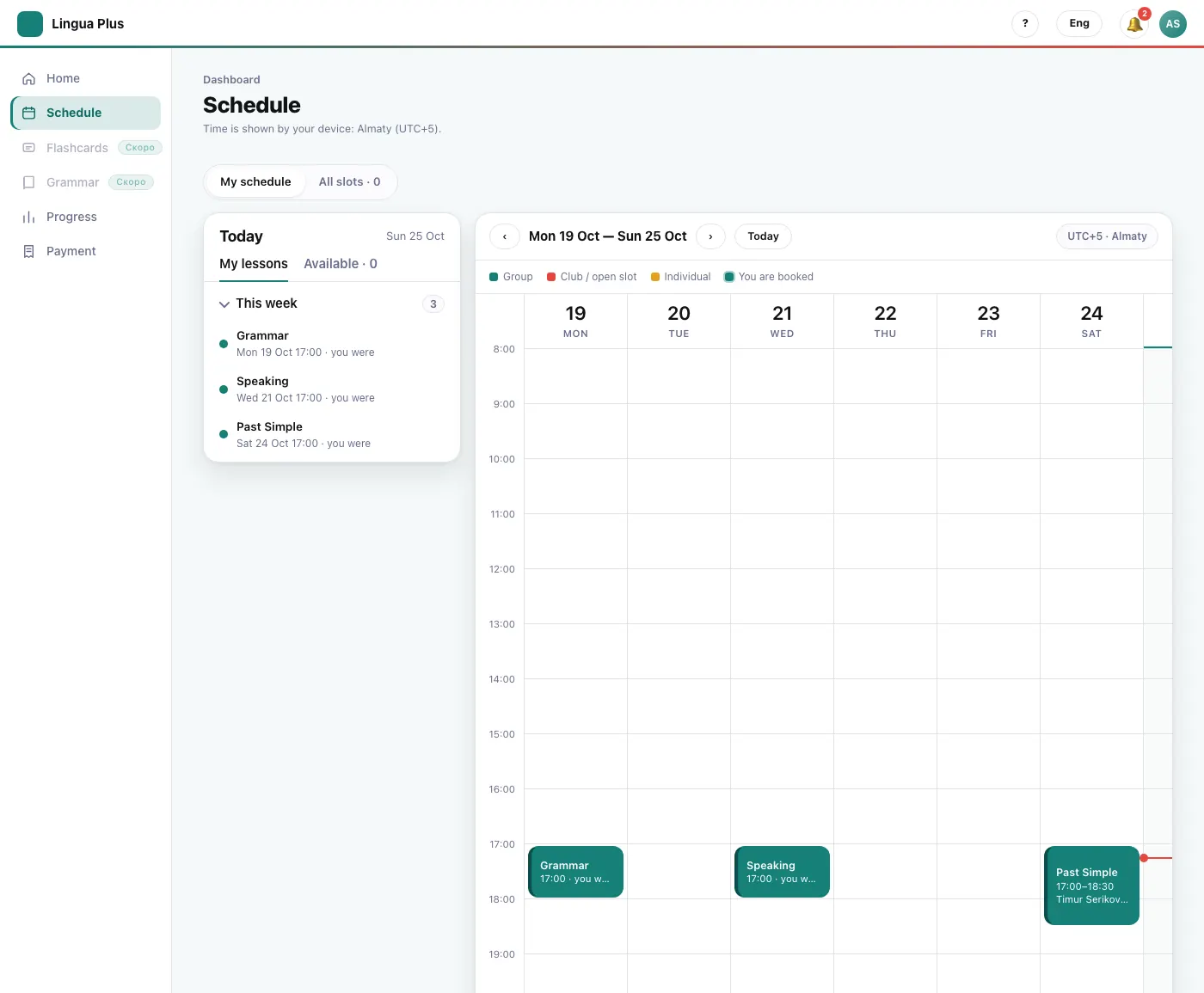
One calendar for students, teachers, and the school
Students book group lessons, individual lessons, or conversation clubs themselves. If there are no spots — they join the waitlist and get a notification when a spot opens up.
- Available slots, “you’re booked”, cancelled, waiting — all color-coded
- Waitlist with automatic booking when a spot opens up
- Notifications when a teacher cancels a lesson
- The admin doesn’t have to manually collect bookings in messaging apps
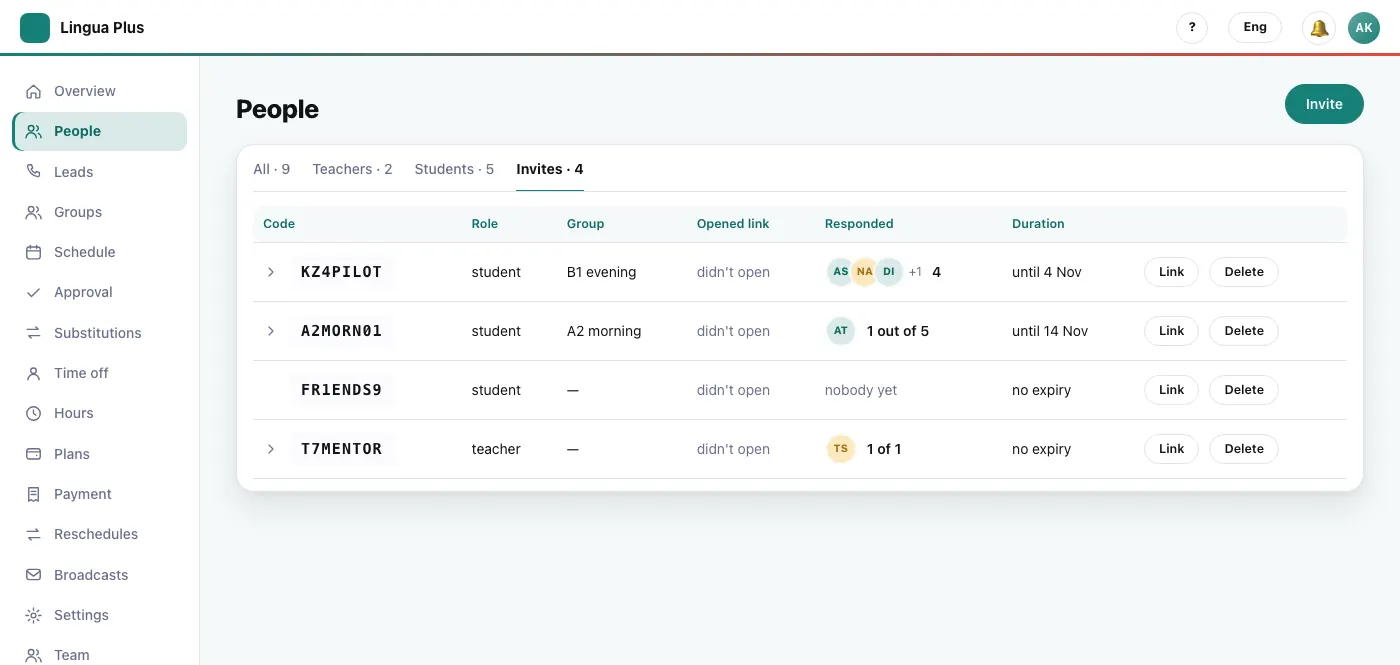
A student joins the school by code
The school or a teacher creates an invitation link for the relevant group. The student registers — and the school and group are filled in automatically.
- Invitations with a role, group and expiry date
- Roles: director, admin, teacher, student — each has its own permissions
- Minors need parental consent (the age depends on the country) — the email is sent automatically
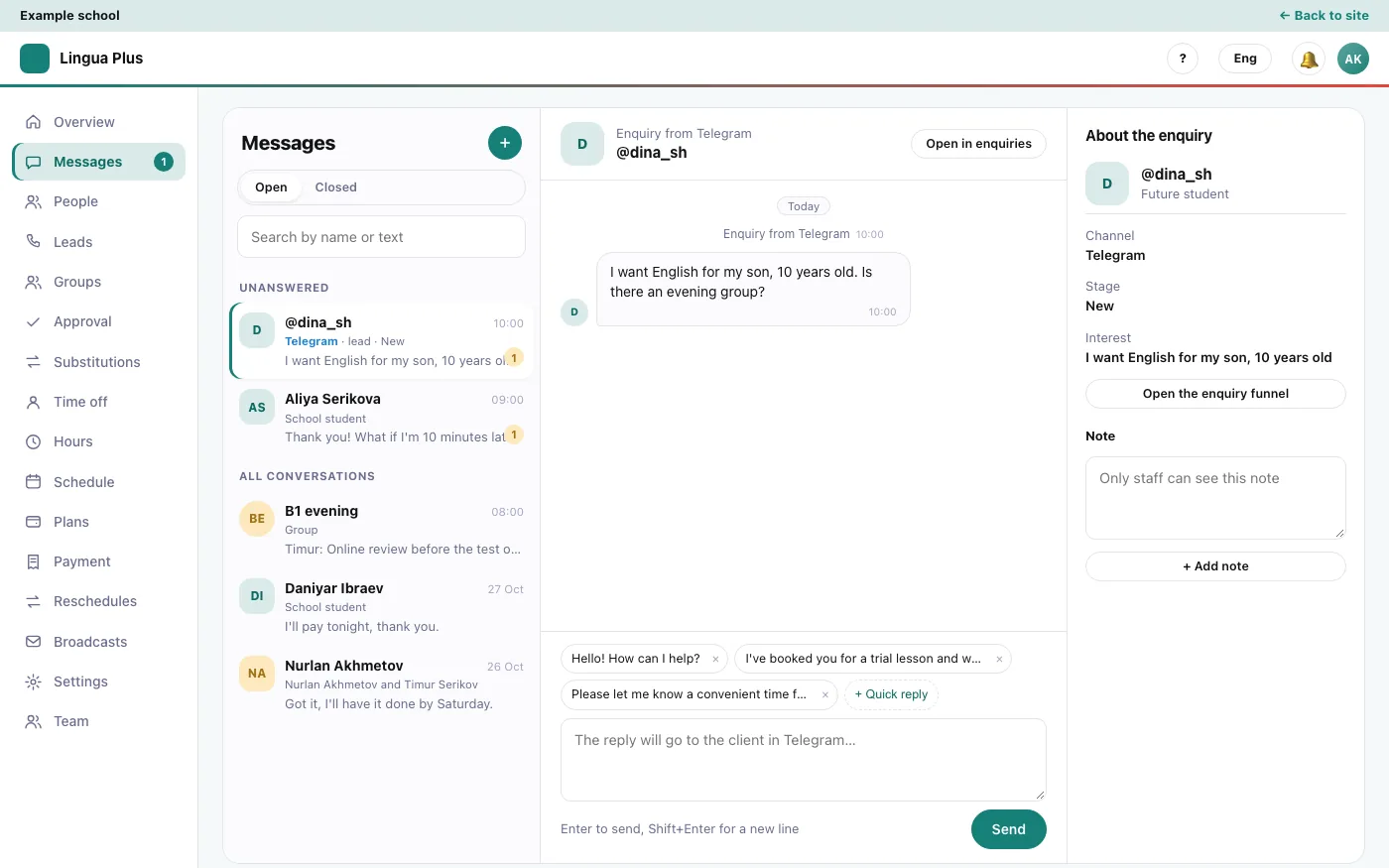
All conversations in one window
Leads from Telegram arrive in the same Messages window as students' conversations with the school, teachers and groups. You can reply right there.
- Your reply to a lead goes to the client in Telegram, unread conversations are marked in the menu
- Quick replies: save common phrases and insert them with one click
- Student chats with the school and with a teacher, plus group chats; a message also reaches the student's Telegram if they connected it
- WhatsApp is in development
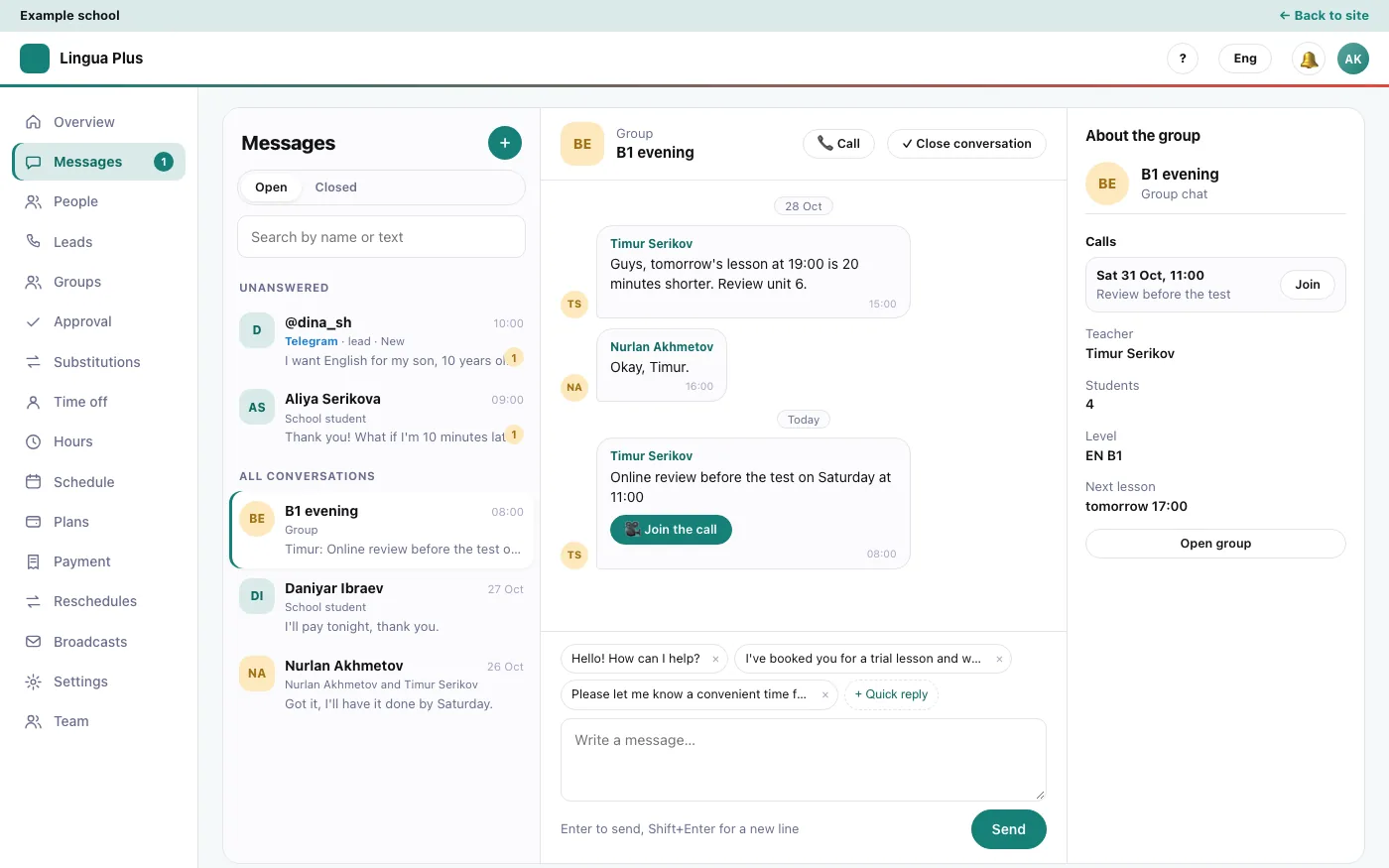
A call right from the conversation
Call a student now or schedule a call for later. Everyone gets a reminder and a link. Nothing to install: the call runs in the browser.
- A reminder 10 minutes before the start, in the app and in the messenger
- Online lessons: a lesson gets a button to join the call
- Camera and microphone check before joining, screen sharing
- Guest link: anyone can join a call without signing up
Everything for the school’s daily operations
From a client’s first call to teacher payouts: front desk, teachers and the director work in one system.
Lessons, groups, money
Schedule, bookings and waiting list, attendance, cancellations, teacher utilization, school revenue.
Telegram (WhatsApp in development)
Lesson reminders, broadcasts and Telegram leads: they arrive in the Messages window next to students' conversations, and you can reply right there.
Churn risk — in advance
Consecutive absences appear in “Needs attention” while there’s still a chance to win the student back. Next to it are revenue, profit and student reviews.
One product — three roles
Each person sees only their own. Click a role to view the dashboard.
Director and admin
The whole school on one screen: lessons, attendance, money and what needs attention.
- Revenue, expenses and profit, lead pipeline, lesson packages expiring soon
- Churn risk and reasons, student recommendations (NPS)
- Admins get only the sections they need
Teacher
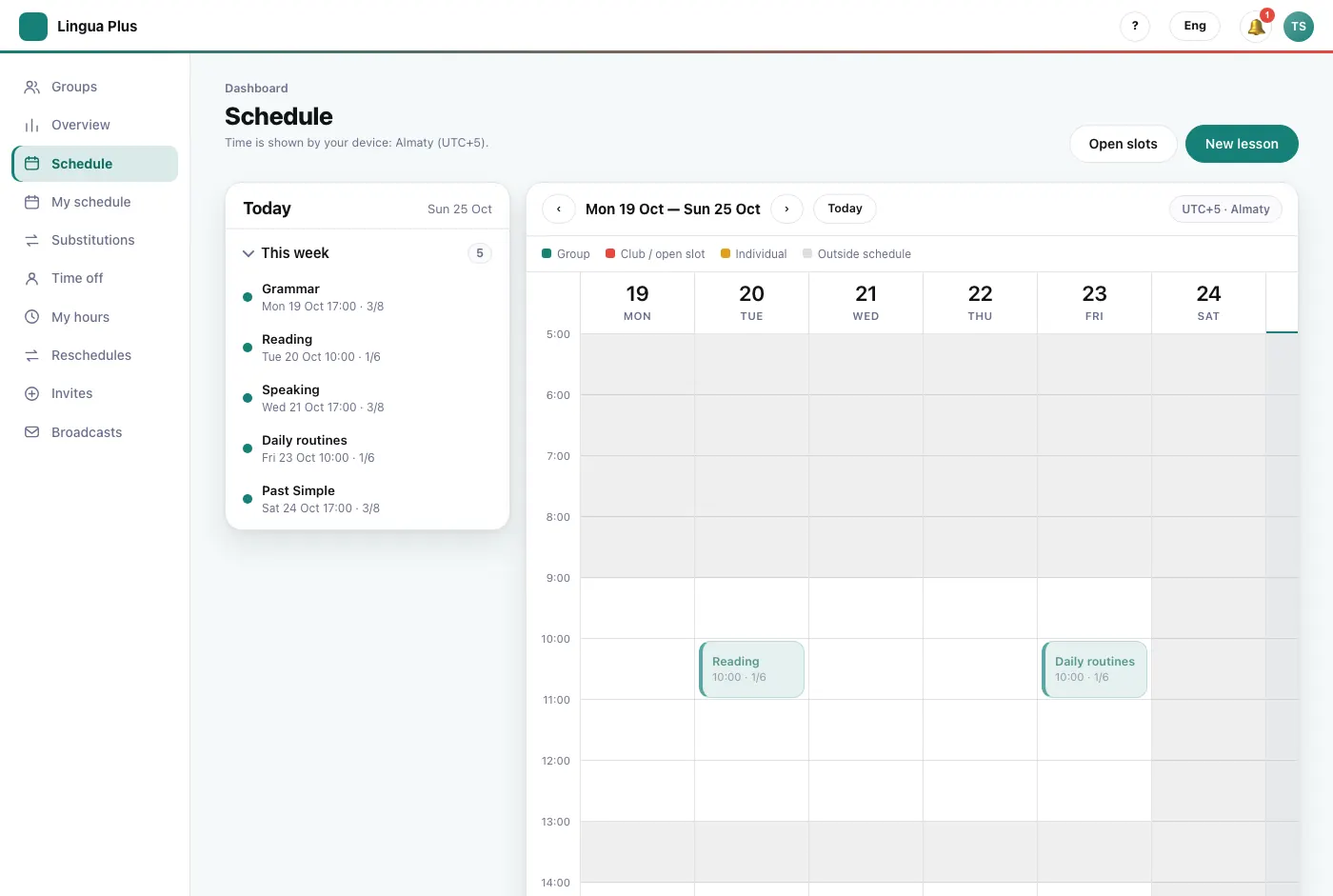
Weekly schedule, groups and attendance. If the school tracks hours, there’s also a work schedule and hours.
- Week calendar: hours outside your schedule are marked in gray
- Mark “attended / no-show” directly in the lesson
- Substitutions, vacations and sick leave, timesheet
Student
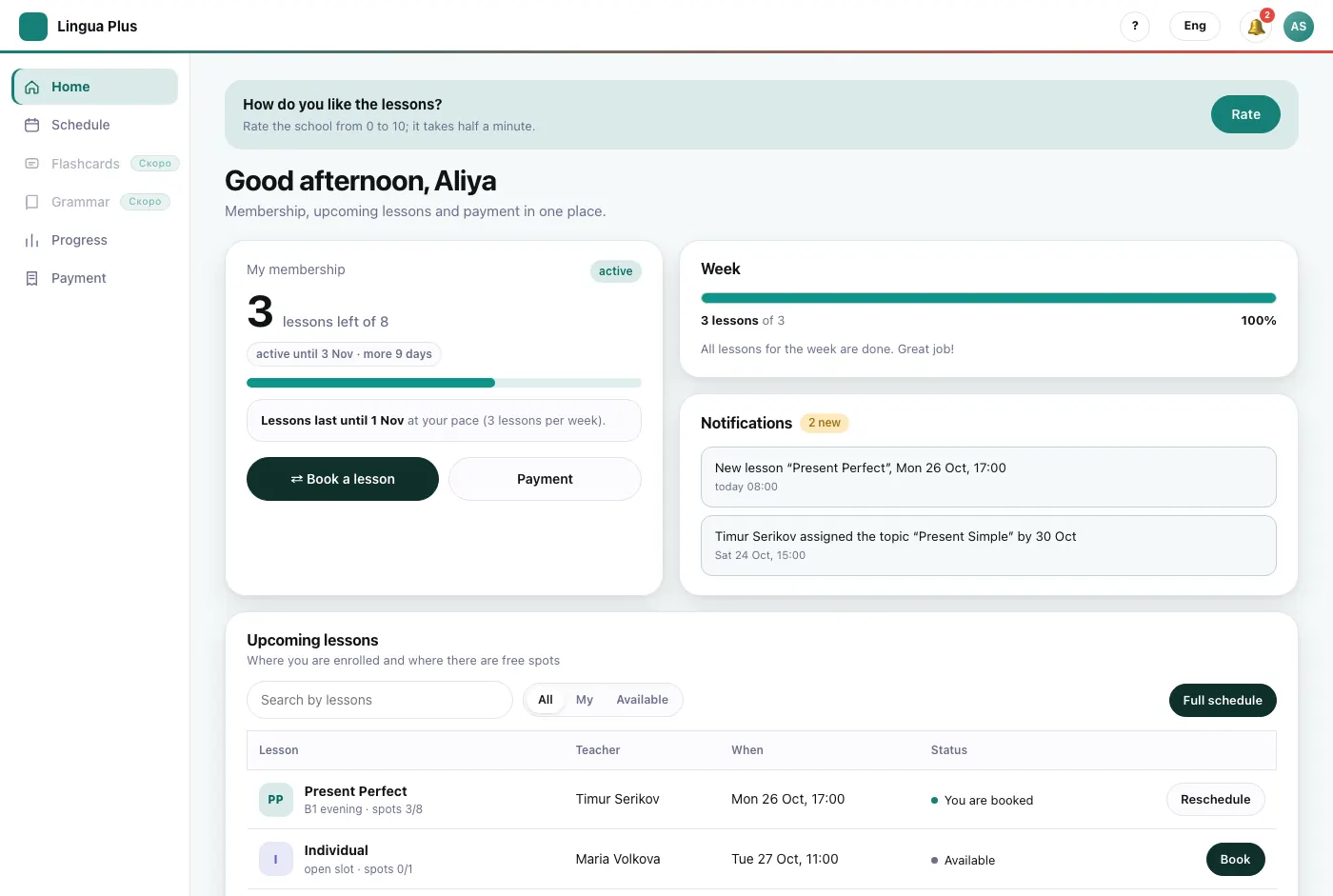
Lesson package, upcoming lessons and payment in one place, on mobile and desktop.
- How many lessons are left and until what date they’ll last
- Lesson booking, rescheduling and waiting list
- Reminders in Telegram (WhatsApp in development)
Teaching on your own, without a team? There’s a dashboard for tutors. And students can learn words in the GreateWay app.
Features
Everything a school needs is in one dashboard. Features are divided into core and modules: take the full plan or add only what you need.
Schedule and booking
One calendar for the student, teacher and school: groups, individual slots, clubs, waiting list. The school sets the monthly rescheduling limit.
Attendance
Marking “attended / no-show” in the lesson, history in the student profile, cancellation rate, and lessons deducted for late cancellations.
Leads and pipeline
A board for the front desk from first call to booking. Leads from Telegram (WhatsApp in development) appear automatically and arrive in the Messages window: you can reply to the client there or from the lead card, and the system reminds you about the call.
Prices, lesson packages, payments
Your own price list for lessons, lesson packages and invoices, payment tracking (bank transfer, cash, card terminal), reminders for overdue payments. Online card payment is in development.
Teacher hours tracking
Scheduling and weekly approvals, substitutions, vacations and sick leave, timesheets and payroll: for schools with hourly or salaried rates.
Telegram (WhatsApp in development)
Lesson reminders, reschedules, cancellations and broadcasts are sent to students and parents via messenger, with times shown in their time zone.
Director overview
Revenue, expenses and profit, sales funnel, lesson packages expiring soon, churn risk with reasons, and student post-lesson ratings (Net Promoter Score, NPS).
Permissions and activity log
Admins are granted only the sections they need (front desk, manager, assistant director), and the log shows who changed what.
Parental consent
For minors, the account is activated after parental confirmation by email. Age depends on the country.
Four languages
Dashboard, emails and messenger messages in English, Spanish, Russian and Kazakh.
School branding
Your own logo and school accent color in the dashboard — free.
Coming soon
Words and grammar soon
Students learn the language in the same dashboard: word cards with smart repetition and level-based grammar.
Desktop app in development
New words from what a student reads go into their cards in one click.
Online payment in development
Pay for a lesson package by card right in the dashboard, with no transfers or reconciliation.
The first schools help choose what we build first.
See the dashboard in action
The “Lingua Plus” school dashboard will open: click around and look at the schedule, payments and leads. No setup or registration required.
Director
School overview with finances and profit, leads, payments, team and permissions, settings.
Log in as directorPlans and modules
Start simple: booking, payment and schedule. Need analytics or leads? Connect the module you need or switch to a plan where it’s already included.
| Features | Start | Growth | Pro |
|---|---|---|---|
| Core: students, groups, schedule, booking, attendance, rescheduling, invoices and payment acceptance (QR and bank details), reminders, bot, import | ✓ | ✓ | ✓ |
| Lesson packages: package builder, lesson balance, auto-invoices | add-on. | ✓ | ✓ |
| Leads: Telegram (WhatsApp in development) pipeline, trial lessons | add-on. | ✓ | ✓ |
| Broadcasts to groups and students | add-on. | ✓ | ✓ |
| Analytics: money (revenue, expenses, profit, debtors) | add-on. | add-on. | ✓ |
| Analytics: retention (churn risk, NPS) | add-on. | add-on. | ✓ |
| Ratings and goals: lesson ratings, teacher goals and payouts | add-on. | add-on. | ✓ |
| Team: admins with permissions, activity log | add-on. | add-on. | ✓ |
| Staff teachers: work schedule, substitutions, absences, timesheet | add-on. | add-on. | ✓ |
| Flashcards and grammar for students (coming soon) | add-on. | add-on. | ✓ |
✓ is included in the plan. add-on. can be added separately. Adding modules one by one is cost-effective while you need one or two, but when you need many, the “Pro” plan will be cheaper.
We’ll help you get started
Submit a request: we’ll help migrate students from your previous system and set up your dashboard.
Submit a leadFAQ
Can I enable only the features I need?
Yes. Every plan always includes the core: bookings, payments, schedule, attendance. Everything else is organized into modules (lesson packages, leads, broadcasts, analytics, and others): you can enable them separately or choose a plan that already includes them.
How does a student join their school?
Using an invitation code from a teacher or the school — it automatically fills in the correct school and group during registration.
Do I need to migrate data from another CRM?
There’s no need to enter anything again. Export your student list from your current program (Excel or CSV) and upload it in your dashboard: “People → Import from file.” Columns are detected automatically; before uploading, you’ll see who will be added and what needs fixing, and groups are created automatically. Students will receive links to set their own password. We’ll help with the migration on a call.
Can I use my own branding?
Yes. The school’s logo and accent color in the dashboard are free.
Who can see the school’s finances?
Revenue and payments are visible to the director and to admins whom the director has granted the “Payment” permission. Expenses, profit, and payroll are visible only to the director. Teachers see their own groups and students; students see their own schedule, lesson package, and payment.
What about minor students?
The age up to which parental consent is required depends on the school’s country. During registration, the parent’s or guardian’s email is requested, and the account will only become active after confirmation via the link in the email. A parent can receive notifications about lessons and absences in Telegram (WhatsApp in development).
What languages does the dashboard support?
English, Spanish, Russian and Kazakh. Each user chooses their language, and emails and messenger messages are sent in that language.
How do I accept payments?
An admin issues an invoice and records the payment received: bank transfer, cash or card terminal. The student sees the invoice and payment details in the dashboard. Online card payments are in development.
Where is the data stored?
The service is currently hosted on servers in Kazakhstan (Astana). For schools in the EU and Switzerland, hosting in Europe is planned. Details are in the privacy policy.
Does it work on a phone?
Yes. The dashboard is optimized for phones and tablets, and there’s nothing to install. A teacher can mark attendance, and a student can book a lesson from their phone.
What happens on the first call?
We’ll walk you through the platform in 20 minutes using your group as an example, discuss the terms, and agree on setup. Submit a lead below — we’ll reply within one business day.
Submit a lead
We’ll walk you through the platform on a 20-minute call.
Submit a lead — we’ll get in touch, discuss the terms, and set up your school together with you: configure your dashboard and migrate your students.
- We’ll reply within one business day
- Your school’s logo and color — free
- No commitment — a conversation first